

Which compact SUV has the smarter cabin tech for Williamsburg, VA drivers — the Rogue or the CR-V?
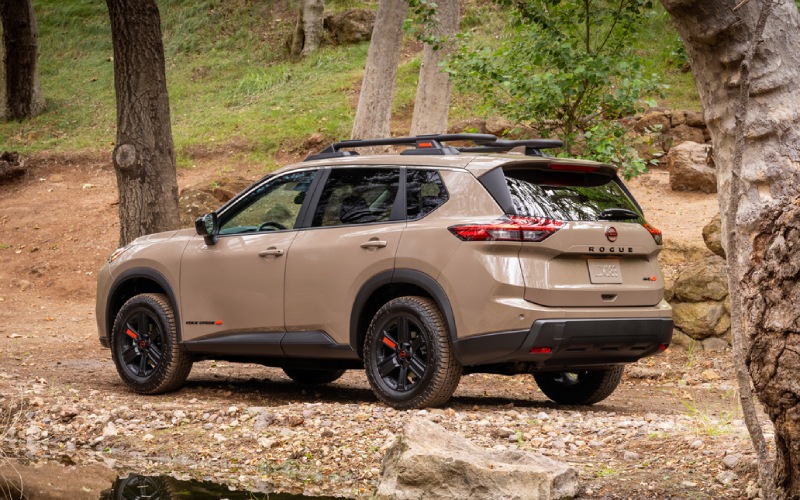
Nissan of Hampton – Which compact SUV has the smarter cabin tech for Williamsburg, VA drivers — the Rogue or the CR-V?
When drivers compare these two favorites, a common question rises to the top: which compact SUV feels smarter and more helpful in the cabin, especially for daily life around Colonial Parkway, busy school drop-offs, and weekend runs into town? Let’s look at how the Nissan Rogue and the Honda CR-V organize screens, voice features, and camera tech—and how that translates to less stress and more clarity on the road.
At-a-glance: displays, voice control, and app integration
Both SUVs deliver the essentials: crisp touch screens, easy smartphone pairing, and voice assistance. The Rogue steps up with available dual 12.3-inch displays—a large, high-resolution center touch-screen alongside a customizable digital dashboard—so maps, audio, and key drive data are always in view. On certain trims, Google built-in ties everything together with Google Maps™, select apps via Google Play, and natural-voice control through Google Assistant. The CR-V counters with a clear 9-inch touch-screen on all trims and standard wireless Apple CarPlay® and Android Auto™, while Google built-in is standard on the Sport Touring Hybrid. In everyday terms, both deliver the connectivity you want; the Rogue’s larger available screens simply reduce toggling and help you keep your focus forward.
Where the Rogue truly separates itself is how it uses cameras and on-screen intelligence. Its available 3D Enhanced Around View® Monitor lets you rotate a 360-degree perspective right on the display, so you can see curbs, corners, and cross-traffic edges more clearly. The available Invisible Hood View adds a “see-through” perspective at low speeds to help you spot obstacles and keep wheels pristine—clutch for parallel parking near Merchants Square and threading tight alleys behind shops. The CR-V offers a helpful multi-angle rearview camera, but it doesn’t match the Rogue’s 360-degree, rotatable, and hood-clearing perspectives.
Voice, navigation, and calm commutes
Rogue’s available Google built-in keeps navigation, climate, and apps tied to one voice system. Just say the word to queue up a route, adjust temperature, or search for a coffee stop before a morning seminar. The system’s natural-language processing and familiar Google Maps™ visuals minimize friction—less tapping, more clarity. The CR-V with Google built-in offers a similar experience on the Sport Touring Hybrid. On trims without it, wireless phone mirroring works smoothly, but some drivers prefer the “phone-free” simplicity of built-in apps during long commutes or family trips.
Audio matters, too. The Rogue’s available Bose® Premium Audio System surrounds the cabin with balanced, clean sound. On the CR-V, the Bose system is also available, but only on the Sport Touring Hybrid. If you’re looking for an upscale, no-compromise soundstage on a non-hybrid configuration, Rogue gives you more pathways to get there.
Parking, sightlines, and those tight Williamsburg spots
Williamsburg’s charm includes narrow lanes, historic brick, and snug curb spaces. That’s precisely where Rogue’s camera tech shines. The 3D Enhanced Around View® Monitor doesn’t just show what’s behind; it shows what’s around, with selectable angles that help you avoid scuffing wheels or second-guessing your spacing. Invisible Hood View is especially helpful for low curbs or planters that disappear from the driver’s seat. The CR-V’s multi-angle camera is useful for reversing, but it simply doesn’t offer the same comprehensive perspective.
Daily organization: screens, storage, and small wins
Beyond the screens, Rogue is designed to keep your day organized. The available Dual Panel Panoramic Moonroof brightens the cabin in a way a standard moonroof can’t, and Tri-Zone Automatic Temperature Control gives all passengers a say in comfort. The Divide-N-Hide® cargo system lets you separate groceries from gear or secure smaller items that tend to roam. The CR-V answers with a clean dash layout and dual-zone climate. Ergonomics are good in both, yet Rogue’s combination of larger displays, added climate zone, and flexible cargo storage are the small wins that lower stress in real life—especially when everyone piles in with backpacks, sports bins, and shopping bags.
How do driver-assist features support tech usability?
Cabin tech is only as helpful as the confidence that surrounds it. Rogue’s standard Nissan Safety Shield® 360 helps with Automatic Emergency Braking with Pedestrian Detection, Blind Spot Warning, Rear Cross Traffic Alert, Rear Automatic Braking, Lane Departure Warning, and High Beam Assist. Available ProPILOT Assist adds hands-on support for highway cruising, while the camera suite’s 360-degree visibility makes parking tech feel natural, not intrusive. The CR-V’s Honda Sensing® brings a robust baseline, too, including Collision Mitigation Braking System™, Lane Keeping Assist, and Traffic Jam Assist on select trims. Both sets of features are excellent for everyday confidence; Rogue’s unique camera perspectives make its parking and low-speed aids feel a notch more intuitive.
Who benefits most from the Rogue’s approach?
If your daily routine includes tight parking, frequent school pickups, and historic-district streets where curbs and bollards sneak up on you, the Rogue’s camera and display strategy is a standout. If you prioritize a hybrid trim with Google built-in and you’re comfortable relying primarily on a rear camera for parking, the CR-V Sport Touring Hybrid makes sense. For everyone else, Rogue’s screen real estate, voice integration, and 360-degree visibility bridge the gap between “connected” and “confident.”
- Screen strategy: Rogue’s available dual 12.3-inch displays reduce menu hopping; CR-V’s 9-inch screen is crisp but smaller.
- Camera confidence: Rogue’s available 3D Enhanced Around View® Monitor with Invisible Hood View eases tight parking; CR-V lacks a 360-degree camera.
- Voice and apps: Google built-in is available on Rogue and standard on CR-V Sport Touring Hybrid; both offer wireless Apple CarPlay® and Android Auto™.
- Cabin comfort: Rogue offers Tri-Zone climate and a panoramic moonroof; CR-V delivers dual-zone climate and a standard moonroof.
- Cargo flexibility: Rogue’s Divide-N-Hide® adds everyday organization; CR-V provides a straightforward, roomy cargo bay.
Frequently Asked Questions:
Does the CR-V offer a 360-degree camera like Rogue?
No. The CR-V includes a helpful multi-angle rearview camera, but it does not offer a 360-degree camera system. Rogue offers an available 3D Enhanced Around View® Monitor with Invisible Hood View.
Can I get Google built-in on both SUVs?
Yes. Rogue offers Google built-in on select trims. The CR-V makes Google built-in standard on the Sport Touring Hybrid and uses wireless phone mirroring on all trims.
Which SUV has the larger available display?
Rogue offers an available 12.3-inch touch-screen with a 12.3-inch digital dashboard. CR-V uses a 9-inch touch-screen across the lineup.
Which model feels easier to park in older parts of town?
Rogue’s available 360-degree views and Invisible Hood View simplify parallel spots and tight curbs common around Williamsburg’s historic areas.
Still comparing your options? Nissan of Hampton is happy to walk you through trims and technology matchups, including the camera and display combinations that best fit your driving patterns. We’re proudly serving Newport News, Williamsburg, and Seaford with guidance that puts clarity first—so your next compact SUV doesn’t just connect; it instills everyday confidence.
0 comment(s) so far on Which compact SUV has the smarter cabin tech for Williamsburg, VA drivers — the Rogue or the CR-V?